


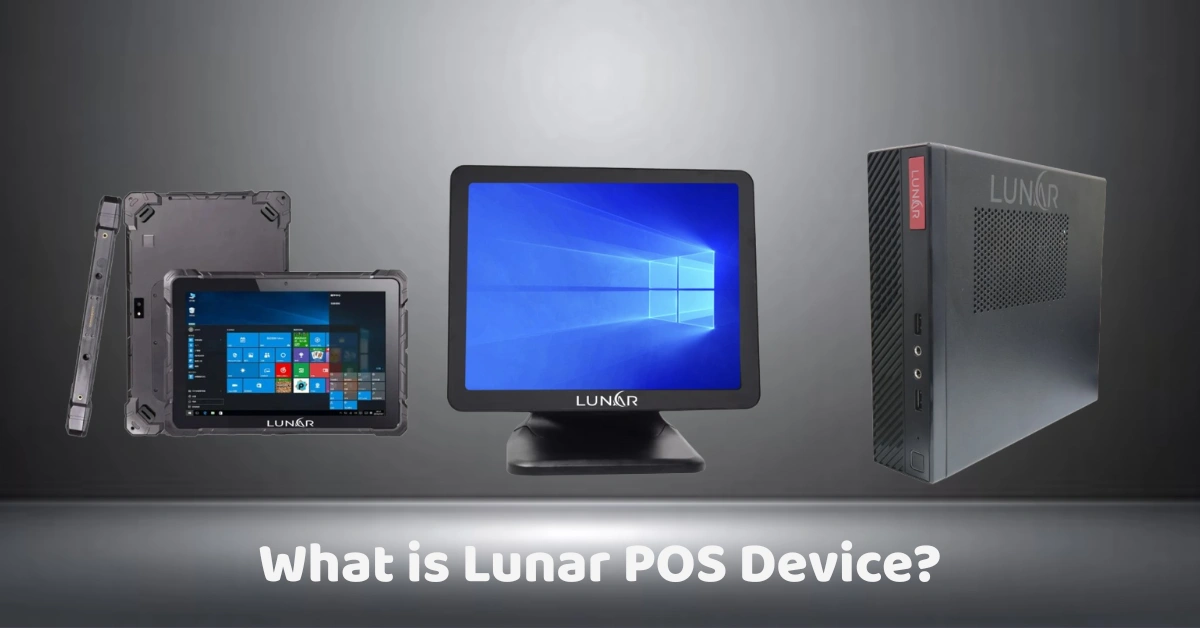
I still remember the first time I watched a small shop owner close out her day with a calculator, a notebook, and a shoebox of receipts. It took her almost an hour. When I asked why she didn't use a POS, she shrugged and said, "Because I thought those were for big stores."
That's a really common assumption, and it's usually wrong. Today's POS hardware is built for businesses of every size, and the Lunar POS device is a good example of what a modern, all-in-one terminal looks like. So let's break it down in plain English: what it is, what it does, and how to tell whether it belongs at your counter.
What Is a Lunar POS Device?
A Lunar POS device is a point-of-sale terminal: the hardware (and the software running on it) that you use to ring up sales, accept payments, print receipts, and keep track of what's happening in your business.
If "point of sale" is a new term for you, the Wikipedia overview of point of sale is a handy primer. In short, it's the moment and place where a customer pays you, and a POS device is the tool that handles that moment.
The simplest way to think about the Lunar POS device is as a cash register that went to college. It still takes the money, but it also remembers every sale, updates your stock, and builds your reports while you get on with running the shop.
How a Lunar POS Device Works
Don't worry, there's no rocket science here (sorry, I had to). A typical sale goes like this:
- You scan or tap an item. The device looks up the price and adds it to the order.
- The customer pays. Cash, card, or e-wallet, whichever your setup supports.
- A receipt prints or gets sent digitally.
- Behind the scenes, everything updates. Inventory drops by one, the sale lands in your report, and your end-of-day total takes care of itself.
That last step is the real magic. A traditional cash register stops at step two. A POS device keeps working after the customer walks away.
The Hardware Side
Most POS terminals bundle a touchscreen, a processor, and connections for add-ons such as receipt printers, barcode scanners, and cash drawers. The idea behind an all-in-one device is that you don't have a tangle of separate gadgets fighting for counter space. If you want to see the range of options, browse POS hardware or take a look at a typical all-in-one POS device.
The Software Side
The hardware is only half the story. The software is where you set up your menu or product list, manage prices, and run reports. A good system lets you check your numbers without being stuck behind the counter. You can see how this works in practice in the POS software features.
Key Features Worth Looking For
Not every business needs every bell and whistle. Here's what matters most, and why.
A Responsive Touchscreen
This sounds boring until you've stood behind a laggy screen with a line of impatient customers. A smooth, responsive display means faster checkouts and fewer awkward silences.
Flexible Payment Acceptance
Customers pay in all sorts of ways now. A good POS device should handle cash, cards, and digital wallets without making you juggle separate machines. If you want to understand the rules behind payments in the Philippines, the Bangko Sentral ng Pilipinas is the place to start.
Built-In Inventory Tracking
Here's where I have a story. A café owner I once chatted with told me she'd run out of oat milk three Saturdays in a row. Nobody had noticed the stock getting low because it lived in someone's head. A POS that tracks inventory would have flagged it before it became a pattern. Features like stock alerts and purchasing tools are often available as POS add-on modules, so you can add them as you grow.
Reports You'll Actually Use
Daily sales, best sellers, slow movers, busiest hours. You don't need a data degree. You just need to know what's working so you can do more of it.
Peripheral Support
Printers, scanners, cash drawers, and customer displays should plug in without drama. Always check compatibility before you buy, not after.
Meet the Lunar Lineup: Three Devices to Know
Not every counter looks the same, so the Lunar range isn’t one-size-fits-all. Here are three devices worth knowing about, and the kind of business each one suits.
Lunar Rugged Tablet
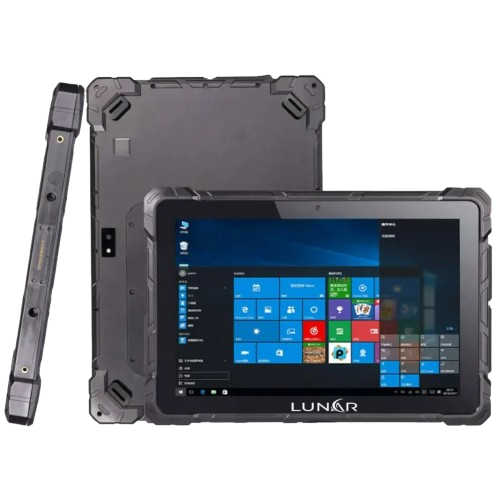
Think of this as the go-anywhere option. Rugged tablets are built to handle the bumps, drops, and spills that a busy shop floor throws at them, which makes them a natural fit when you’re not tied to one spot. Taking orders at the table, serving a long queue, selling at an event, or checking stock in the back room are all easy to picture with a tablet in hand.
Lunar Touchscreen Monitor
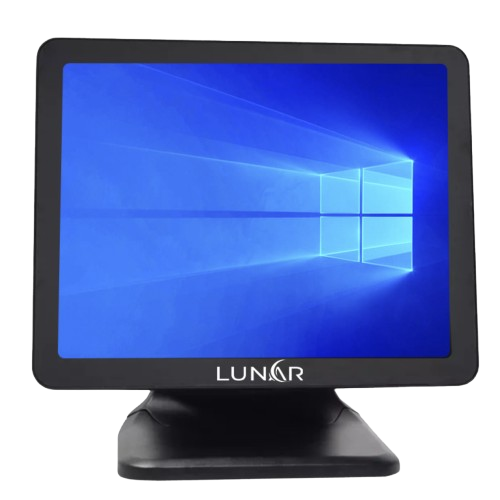
If you like a classic, fixed counter setup, a touchscreen monitor is the clean way to do it. It gives you a big, tappable screen at the till, and it pairs with a computer to run your POS software. It’s a great choice if you want something simple and familiar, or if you already have a computer you’d like to put to work.
LUNAR MP-12 (Mini PC)
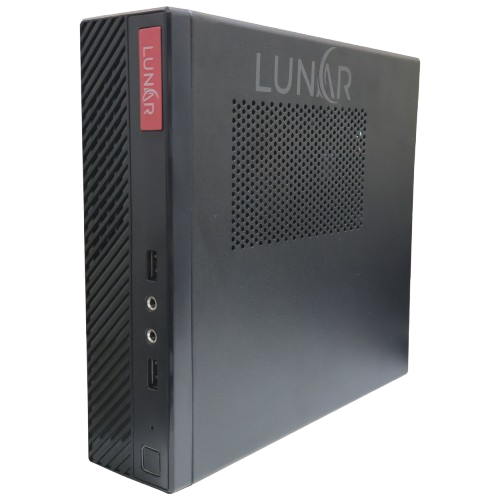
The MP-12 is the brains of the operation in a small package. A mini PC runs your POS software and tucks neatly out of the way, behind a monitor or under the counter, so your workspace stays tidy. It’s a popular pick when counter space is tight.
What Can You Actually Do With It?
Features are nice, but let's talk about real life.
Speed Up the Line
Faster checkout means more sales per hour. That matters most during rushes, like lunch hour, payday weekends, and the holiday season.
Stop Guessing About Stock
Instead of counting shelves with a clipboard, your device keeps a running tally. You reorder based on facts, not hunches.
Close the Day in Minutes
Remember the shoebox of receipts? With a POS, end-of-day reconciliation shrinks from an hour of squinting at paper to a few taps and a printed summary.
Stay Compliant With Receipts and Invoicing
For businesses in the Philippines, proper receipting and invoicing rules matter, and they keep evolving. Keep an eye on the BIR website for the latest requirements, and choose a provider that's properly accredited. You can see how that works on this BIR accreditation page.
Who Is a Lunar POS Device Best For?
Almost any business that sells things face to face can benefit, but some fit especially well.
Retail Stores
Boutiques, grocery shops, and convenience stores love POS devices for barcode scanning and live stock counts. Here's more on POS for retail businesses.
Cafés and Bars
Speed and accuracy are everything when orders are flying and the line is out the door. If that sounds like your place, see how a café POS or a bar POS system handles it.
Pharmacies
Pharmacies deal with product expiry, strict record-keeping, and lots of small items. Here's a closer look at pharmacy POS.
Small and Growing Businesses
Maybe you started at a market stall with a cash box. That's fine! A device like this is something you can grow into, rather than something you'll have outgrown in six months.
Lunar POS Device vs. a Traditional Cash Register
Let me be fair: a basic cash register still has its place. If you sell five items, have no staff, and never need a report, you might be perfectly happy with one.
Here's how they usually compare:
- Recording sales: A cash register keeps basic totals. A POS device keeps itemized, searchable records.
- Inventory: A cash register doesn't track stock. A POS device updates it with every sale.
- Reports: A cash register offers very little. A POS device gives you detailed sales and performance reports.
- Payments: A cash register is built mostly around cash. A POS device handles cash, cards, and digital wallets.
- Growth: A cash register has a ceiling. A POS device scales with you as you add counters or branches.
The moment you catch yourself asking "what sold best last month?" or "how many do I have left?", you've outgrown the register.
What to Check Before You Buy
I'm a big believer in boring homework before a purchase. It saves a lot of regret later. Run through this list:
Match the Device to Your Real Needs
Don't pay for features you'll never use. A one-counter shop and a three-branch restaurant have very different needs.
Look at the Total Cost
The sticker price of the hardware is just the beginning. Ask about software subscriptions, payment processing fees, setup, and support.
Think About Security
You're handling customers' payment details, so security isn't optional. The PCI Security Standards Council publishes the global standards for protecting card data, and it's worth asking any provider how they meet them.
Ask About Local Support
I once heard a story about a bakery whose terminal froze at 6 a.m. on a Saturday. The vendor's support line? Closed until Monday. Make sure help is reachable when you actually need it.
Ask About Offline Mode
Internet hiccups happen. Find out whether the device keeps selling when the connection drops and syncs once you're back online.
Pros and Cons (The Honest Version)
The good stuff
- Faster, more accurate checkouts
- Real-time stock and sales visibility
- Fewer manual errors
- Room to grow
The trade-offs
- Upfront investment compared with a basic register
- A short learning curve for you and your staff
- You'll want reliable internet for cloud features, or an offline mode for the gaps
None of these are dealbreakers. They're simply things to plan for.
Frequently Asked Questions
How much does a Lunar POS device cost?
Pricing depends on the model, the software plan, and what accessories you add. Ask for a full quote that covers hardware, software, and support, so there are no surprises.
Can I use it if my internet goes down?
Many modern POS setups offer some form of offline mode, but it varies. Confirm this before buying, especially if your connection is unreliable.
Is it too much for a tiny business?
Not at all. Plenty of micro-businesses use POS devices to stop losing track of stock and cash. Start with what you need and add more later.
Do I need to be tech-savvy?
If you can use a smartphone, you can learn a POS. Good providers will walk you and your staff through the basics.
Final Thoughts
So, what is a Lunar POS device? It's an all-in-one tool that helps you sell faster, keep better records, and make smarter decisions without drowning in paperwork. Whether you run a café, a retail shop, or a pharmacy, the right POS can quietly give you hours of your week back.
Ready to see what a modern POS could do for your business? Book a free demo with Divergent POS and we'll help you find a setup that fits the way you work.
