


A neighbor of mine runs a small bakery, and her Sunday mornings used to be a lesson in patience. The pandesal came out hot, the line wound toward the door, and her cashier spent half the time scrolling through a long product list to find the right item. Every few minutes someone sighed and checked their watch.
She didn't need a fancy, complicated system. She needed something fast: ring up the sale, take the payment, and let her see at the end of the day what actually sold. That's the idea behind a quick POS.
If you're wondering what Quick POS is, how it works, and whether it fits your business, here's a plain-English guide.
What Is Quick POS?
The Simple Definition
Quick POS is point of sale software built to make selling fast and day-to-day management simple. Divergent POS describes its Quick POS software around four ideas: business insights, simplified management, flexibility that grows with you, and affordability with flexible payment plans.
The name also fits a wider category. Quick POS software, in general, is aimed at speed-critical environments where customer throughput directly affects revenue. In other words, if your business lives or dies by how many customers you can serve in a busy hour, "quick" matters.
Why "Quick" Is the Point
A lot of POS systems try to do everything, which can mean more screens, more setup, and a longer learning curve. A quick POS flips that. It focuses on the things you do all day: ringing up sales, taking payments, tracking stock, and checking your numbers. The goal is to get out of your way.
How Quick POS Works
A Typical Sale, Step by Step
The process is simpler than most owners expect:
- Pick the items. Tap, search, or scan the products the customer wants.
- Take payment. Accept cash, card, or an e-wallet, depending on how you've set things up.
- Issue the receipt. A compliant receipt or invoice is printed or sent.
- Data syncs. The sale updates your reports and stock levels.
That's it. The less thinking your cashier has to do at the counter, the faster the line moves.
What Happens Behind the Scenes
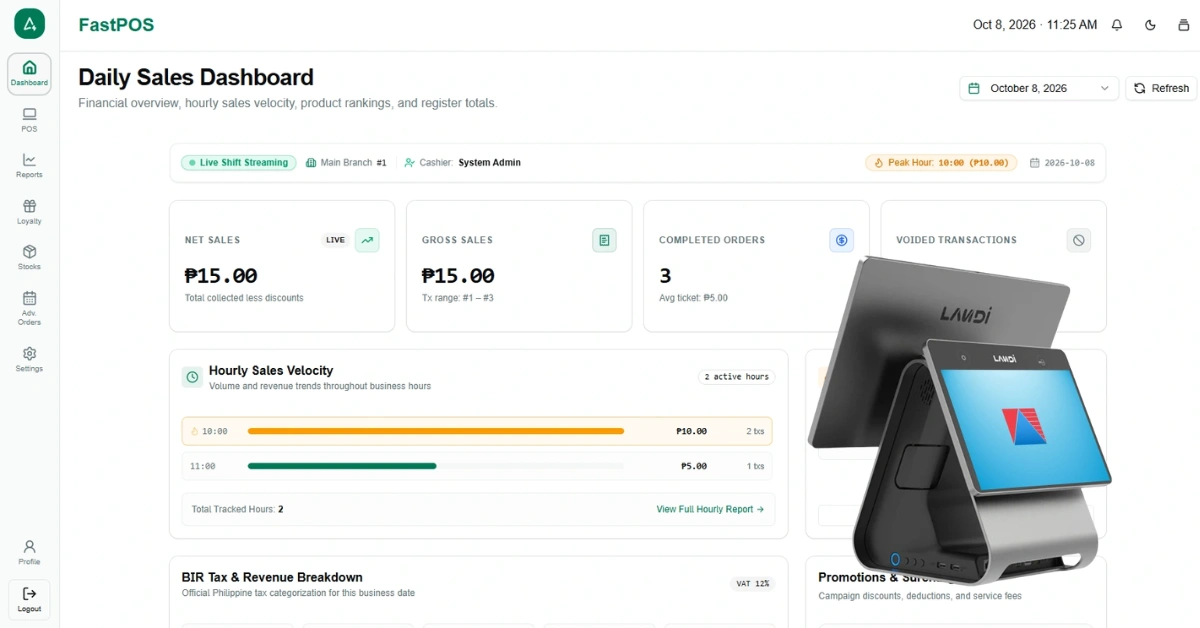
Every sale feeds into your reports. Instead of adding up receipts at closing time, you can open a report and see what sold, when, and who sold it. That's where a quick POS quietly earns its keep. It's not only the speed at the counter. It's knowing your numbers without a spreadsheet marathon.
When the Internet Drops
This is the question I hear most from small shop owners in the Philippines, where connections can be unreliable. Divergent POS lists an offline mode that lets you keep selling without internet and syncs your data once you're back online. Ask exactly what works offline in your setup, since limits can apply to some payment types.
Key Features of Quick POS
Here's what Divergent POS highlights for its Quick POS software, plus the everyday tools you'd expect around it.
Business Insights
You get access to sales, reports, and analytics to make smarter, data-driven decisions. Think best sellers, peak hours, and slow movers. A cafe owner I know was sure one drink was her star seller until her reports showed a simpler, cheaper drink was quietly outselling it. Numbers beat hunches.
Simplified Management
Manage staff, branches, and daily operations from one system. If you're a single-shop owner, that means less juggling between notebooks and apps. If you grow into a second location, it means you're not starting from scratch.
Flexible and Scalable
Quick POS is described as working with various hardware setups and growing with your business. You can start with the basics and add devices later. When you need more power, POS add-on modules let you extend what the system does.
Affordable, With Flexible Payment Plans
Divergent POS describes Quick POS as an affordable and powerful option with easy, flexible payment plans available. For small businesses watching their cash flow, how you pay can matter as much as how much you pay.
Everyday Tools Around It
Across Divergent POS software, the site also lists tools that small businesses tend to use daily:
- Park order: save an ongoing sale and resume it later, handy during rushes
- Customer tracking: see purchase frequency and spending
- Expense tracking: record cash added and cash-out transactions from the drawer
- Staff attendance: selfie-based time-in and time-out
- Low stock notifications: alerts before you run out
Please confirm with the team which of these come with Quick POS and which are add-ons, since packages can differ.
What Hardware Do You Need?
A typical setup includes a POS terminal, a receipt printer, a cash drawer, and a barcode scanner. Divergent POS notes that it can supply and install hardware that fits your business, or you can use its recommended hardware. You can browse the available POS hardware to see what fits your counter.
My advice for small shops: don't buy everything at once. Start with what you need to ring up sales and print receipts, then add pieces as your volume grows. Compact, spill-resistant equipment is worth it if your counter is tight.
Benefits of Quick POS
Faster Checkout
Shorter lines mean more customers served in the same busy hour, and fewer walk-aways. That's the most direct return on any POS.
Easier to Learn
A simple system is easier for new staff. Divergent POS says its team provides installation and one day of training, with support after go-live. That kind of quick onboarding matters when your team turns over often.
Clearer Numbers
Instead of guessing, you see. Reports help you decide what to order, what to promote, and what to drop.
Less Admin
Less manual counting, fewer scribbled notes, and an end-of-day routine that takes minutes instead of an hour. A friend who runs a small hardware shop used to spend almost an hour every night reconciling sales by hand. Once reports did it for her, she got her evenings back.
Room to Grow
Start with one counter now. Add a device, a staff account, or another branch later without ripping everything out.
Who Is Quick POS For?
Cafés and Small Food Businesses
Speed is everything at a coffee counter or a small eatery. Quick ordering, takeaway handling, and peak-hour reliability matter most. If you're running a coffee shop, a dedicated cafe POS system is worth a look.
Bakeries
Fast counter sales, daily sales tracking, and knowing which items sell out first are the daily realities of a bakery. A bakery POS fits that rhythm.
Retail Shops
Small shops benefit from barcode scanning, simple stock awareness, and clear daily reports. For product-heavy stores, a retail POS system adds the stock tools that matter.
Service Businesses
Salons, spas, and similar shops need simple billing and staff tracking. A salon POS system can handle the specifics.
When You Might Need Something Bigger
Be honest with yourself. If you run many branches, carry thousands of SKUs with complex stock rules, or need industry-specific workflows like kitchen routing or prescriptions, a more specialized system may fit better. Quick POS is about speed and simplicity, and that's a strength for many shops, but it isn't for everyone.
Quick POS vs. Other Options
| Quick POS | Industry-specific POS | Mobile POS | Cash register + notebook | |
| Main strength | Speed and simplicity | Features built for one industry | Portability | Lowest upfront effort |
| Reports | Built in | Built in, often deeper | Varies | Manual |
| Setup effort | Lower | Higher | Low | Minimal |
| Best for | Small shops and counters | Restaurants, pharmacies, and similar | Pop-ups and roaming sales | Very small or occasional sellers |
| Watch out for | Fewer specialized tools | More to learn | Needs good connectivity | Errors and no insights |
A word on mobile POS: it's generally described as a portable device or app that lets retailers process transactions from a smartphone, tablet, or similar device, and you can read more in this overview of mPOS. Many businesses use both, with a fixed counter for the steady flow and a mobile device for events or busy hours.
BIR Compliance and Setup
For businesses in the Philippines, your POS has to play by the BIR's rules. Sales machines and software that generate invoices and receipts should be accredited with the BIR through its eAccReg system, and the BIR posts a list of accredited sales machines and software on its website. You can read a plain-language summary of how accreditation of sales machines works. Divergent POS describes its systems as BIR-compliant, and you can read more on its BIR accreditation page.
A few other compliance points are worth knowing:
- Invoices: Since the Ease of Paying Taxes Act, POS software should be set up to issue an invoice as the principal sales document, and PwC Philippines has a helpful explainer on the invoicing changes.
- E-invoicing: The BIR's latest circular keeps December 31, 2026 as the deadline for covered taxpayers, and Grant Thornton summarizes it in this tax alert on RMC 98-2026. Not every POS user is automatically covered just because they use a POS, so check whether you fall within a covered group.
- Withholding tax line: A new BIR regulation (RR 6-2026) also requires invoices to show creditable withholding tax as a separate item when it applies, so ask your provider how updates like this are handled.
Rules change often, so confirm current requirements with the BIR or your accountant.
How to Decide If Quick POS Is Right for You
Here's a simple way to approach it.
Map Your Day
Write down how a typical sale moves from start to finish, and where it slows down. Is it finding products, taking payment, or counting up at night? That list is your shopping criteria.
Confirm the Essentials
Ask direct questions:
- Is it BIR-accredited, and how are updates handled?
- Does it work offline?
- What hardware does it support?
- Which reports and tools are included, and which are add-ons?
- What does training and support look like?
Compare the Full Cost
Look at software, hardware, installation, and training together. Divergent POS's homepage lists a monthly subscription and a lifetime ownership option, and you can see current details on the pricing page.
Test It With Real Scenarios
Don't judge by a polished demo alone. Try your messiest situations: a rush-hour sale, a refund, a promo, a split payment, and a sale with the internet off. If the system handles those smoothly, it'll handle a normal Saturday.
Frequently Asked Questions
What is Quick POS?
Quick POS is point of sale software designed to make selling fast and day-to-day management simple, with business insights, simplified management, flexible hardware setups, and affordable payment options.
Who is Quick POS best for?
It suits small to mid-sized businesses where speed and simplicity matter most, such as cafés, bakeries, small shops, and service businesses.
How much does Quick POS cost?
Pricing depends on your setup. Divergent POS lists a monthly subscription and a lifetime ownership option on its site, and a demo will give you a quote based on your needs.
Does Quick POS work offline?
Divergent POS lists offline mode, where you keep selling without internet and your data syncs when you're back online. Ask what's supported offline for your setup.
What hardware do I need?
A typical setup includes a terminal, receipt printer, cash drawer, and barcode scanner. You can use recommended hardware or have it supplied and installed.
Can I add more branches or tools later?
Divergent POS describes the system as flexible and scalable, and offers add-on modules and multi-branch back-office tools. Ask which options apply to your package.
Final Thoughts
Quick POS isn't about having the most features. It's about getting the basics right: fast checkout, clear numbers, simple management, and room to grow. For a lot of small businesses, that's exactly what they need, and nothing they don't.
Here's a small exercise. This week, time the slowest moment at your counter. Is it finding products, taking payment, or closing the day? Whatever you find is where a quick POS should help first.
And if you'd like to see how it handles your own busiest hour, book a free demo and try your real scenarios.
